![Logo-Full-White-1.png]](https://success.staffingreferrals.com/hs-fs/hubfs/Logo-Full-White-1.png?height=40&name=Logo-Full-White-1.png)
There are two ways to bulk update candidate status in Staffing Referrals.
Option 1: Select the candidates to update
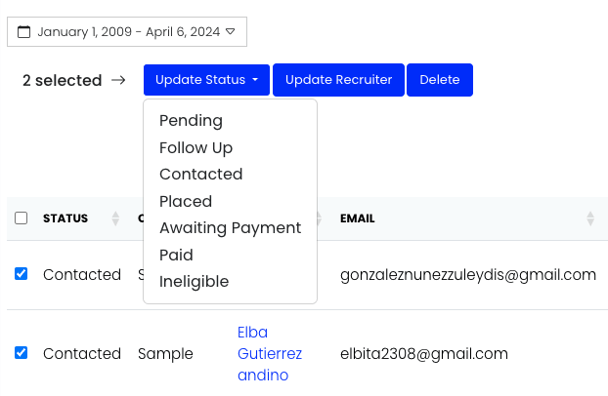
In the "Referrals" > "Candidates" screen, check the boxes next to the candidates you need to update, click "Update Status," and select the new status in the drop-down menu.
Option 2: Upload a list
You can also update many candidates at the same time using a list upload. Click the "Bulk Change Status" button in the top right.
Upload an Excel sheet or CSV with at least one of the following columns:
- Candidate ATS ID
- Candidate email
- Candidate phone number
Select the new status and click "Next."
Verify the column headers and click "Next: Review."
If everything is correct, click the red "Move to [New Status]" button.
Note: You can only use the Bulk Change Status tool to move candidates forward in the referral process (e.g., from "Contacted" to "Placed"). To move a candidate backward (e.g., from "Placed to "Contacted"), update the status manually.
If you have any questions, comments, or feedback, please reach out to support@staffingreferrals.com.