![Logo-Full-White-1.png]](https://success.staffingreferrals.com/hs-fs/hubfs/Logo-Full-White-1.png?height=40&name=Logo-Full-White-1.png)
If your Staffing Referrals pages are hosted on a custom subdomain (i.e., referrals.youragencyname.com), then they will automatically be tracked in your Google Analytics 4 (GA4) account.
If Staffing Referrals is hosting your pages (i.e., youragencyname.staffingreferrals.com), follow these instructions to set up cross-domain tracking.
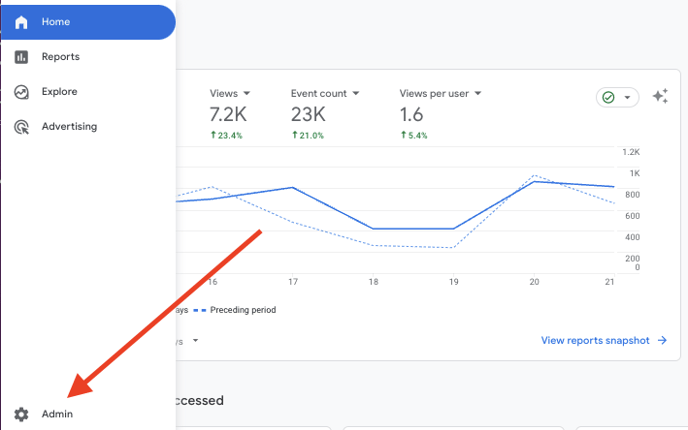
Step 1: Login to Google Analytics and go the Admin area
Step 2: Under “Data collection and modification,” select “Data streams”
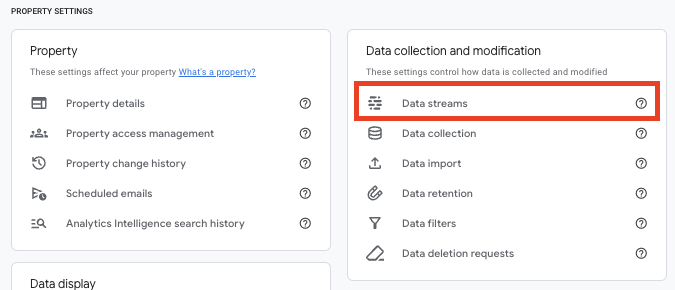
You can use the main data stream for your site or create a new one for Staffing Referrals if you prefer.
Step 3: Add your Staffing Referrals domain to Google Analytics
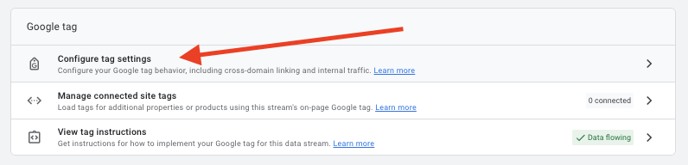
Click on your stream, then click “Configure tag settings.”
In the settings, click “Configure your domains.”
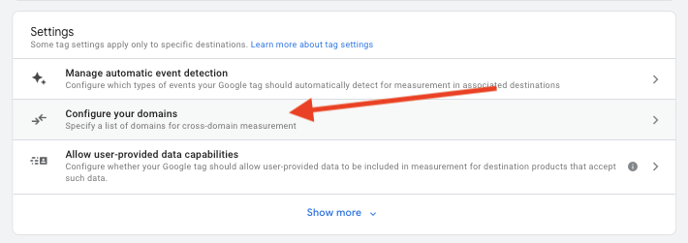
Under “Cross-domain Linking Configuration,” enter the domain for your Staffing Referrals pages. Be sure to specify the match type “Contains.”
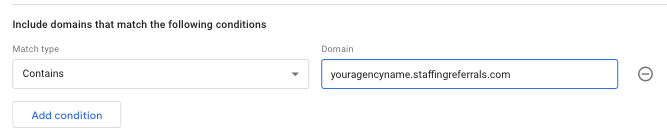
Click “Save.”
Step 4: Enter your measurement ID into Staffing Referrals
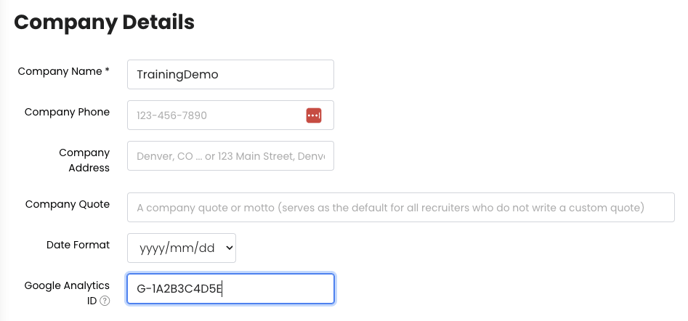
Go back to your stream details and find your measurement ID. It will be in the format
G-XXXXXXXXXX.
In Staffing Referrals, navigate to Settings > Company Settings > Company Details, and enter your Google Analytics 4 measurement ID.
Step 5: Track your referral program traffic
- In your Google Analytics 4 account, go to Engagement > Pages and screens.
- In the drop-down, change the criteria to “Page title and screen class.”
- Search for “Referrals.” Your results will show up as “[Company Name] Referrals.”

If you have any questions, comments, or feedback, please reach out to support@staffingreferrals.com.